

Dr. BOOKING INFORMATION

Important Notice
Before scanning the QR code for payment, click the Contact button below to confirm the doctor’s visit fee and their available timing for today. Only proceed with the payment after verifying all the details. Once the payment is completed, take a screenshot and send it to the contact number below, then follow up with us. Please note that we are not responsible for payments made based on incorrect information.
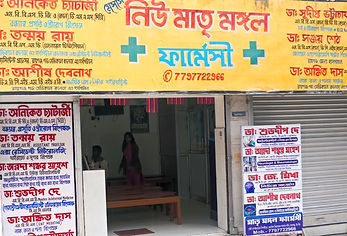

Our Location
Ukilpara,Opposite Lane Of Raiganj NBSTC,Beside Hotel Viraj Raiganj,Uttar Dinajpur, India 733134 West Bengal.
PHONE NO: +91 77977-22966
WHATSAPP NO: +91 83178-17683
Email: newmatrimangalpharmacy@gmail.com
How to Book a Doctor Online?
Welcome to our Online Doctor Booking service! Follow the simple steps below to book an appointment with your preferred doctor.
🕒 Online Booking Hours:
⏰ 7:30 AM - 9:00 PM
Important Notice:
If you need assistance after 9:00 PM, you will not be able to contact us via phone or WhatsApp. However, you can:
✅ Visit our AI Chatboard or Contact Page and fill out your details.
✅ Our team will reach out to you as soon as possible.
If, for any reason, we are unable to contact you, please reach out to us again between 7:30 AM and 9:00 PM, and we will respond immediately.
Step 1: Visit the Doctor Booking Page
-
To see the list of available doctors, go to the Doctor Booking page.
-
There, you will find details about all our doctors, including their specialties and consultation schedules.
-
Next to each doctor’s name, you will see a WhatsApp and Contact button.
-
Click the button to get more information about the doctor or to learn how to book an appointment online.
If you need any assistance, feel free to reach out to us!
Step 2: Check the Doctor’s Availability
-
Click on the Contact button next to your preferred doctor’s name.
-
You will find details about the doctor’s consultation schedule, including available days and timings.
Step 3: Payment Process
-
Go to the Doctor Booking Information page.
-
There, you will find a QR Code for payment.
-
Scan the QR code and complete your online payment.
Important: After making the payment, take a screenshot of the transaction.
Step 4: Confirm Your Booking
Send the payment screenshot to our WhatsApp number or contact us via phone.
Include the following details:
-
Patient’s Name & Details
-
Your Name
Once we verify the details, we will confirm your booking immediately and register your name in our system.
Need Help?
📞 If you need guidance on how to visit the clinic or consult with the doctor, feel free to contact us. Our team is always here to assist you!
Book your doctor hassle-free today! Thank you for choosing our Online Doctor Booking Service.